
Images and PDFs each suit different jobs. A PDF is easier to email as one file, print consistently, and protect with a password. Separate images are easier to edit, post, or drop into a slide. Converting between the two takes a few seconds.
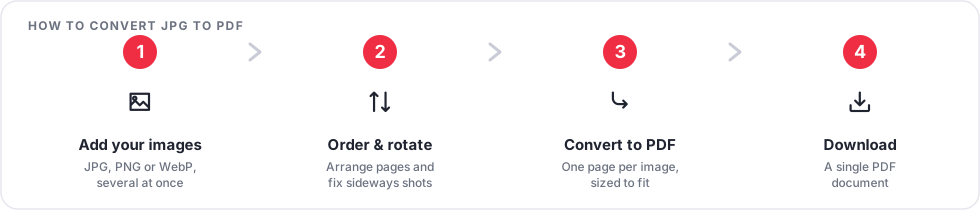
Convert images to a PDF
- Open JPG to PDF (it also accepts PNG and WebP).
- Upload your images and drag them into the order you want.
- Download a single PDF with one image per page.
To combine many photos, such as a set of receipts, Images to PDF does the same job and is built for larger batches.
Convert a PDF to images
- Open PDF to JPG, or PDF to PNG if you need a lossless image.
- Upload the PDF.
- Download a ZIP archive with one image per page.
Choose JPG for photographs and scans, where a smaller file matters. Choose PNG for diagrams, screenshots, and anything with sharp lines or text, where quality matters more than size.
Tips
- Photograph or scan documents straight on and in good light for the cleanest PDF.
- If a converted PDF is large, run it through Compress PDF.
- Need just the words from a PDF instead of pictures of the pages? Use PDF to Text.
Frequently asked questions
Will I lose image quality?
Converting images into a PDF keeps them as they are. Converting a PDF to JPG applies normal JPG compression; use PNG to avoid that.
Can I control the page size?
Each page is sized to its image so there are no unexpected borders.
Are my files kept?
No. Uploads and results are deleted automatically shortly after processing.
Start with JPG to PDF or PDF to JPG.