
Looking for a Cuisinart ice cream maker recipe booklet PDF? This guide shows where to look for the right recipe resources, how to check a PDF before you rely on it, and how to make a PDF into a booklet you can print, fold and keep in the kitchen.
You do not need to be technical. If you already have a recipe PDF, you can skip straight to the booklet steps.
Find Your Recipe PDF Upload Your PDF
Quick Answer
- Find the right PDF. Start with the manufacturer’s own support or manuals pages for your exact model, then your original box and manual.
- Open it and check it. Make sure it opens, the pages are readable and it is for your model.
- Make it a booklet. Upload it to the free PDF Booklet Maker, check the sheet preview and download.
- Print one test sheet, double-sided, flipping on the short edge. Then print the rest, fold and staple.
PDFCherry is not affiliated with Cuisinart and does not host Cuisinart manuals. If you do not have a recipe PDF yet, this page cannot supply one — it helps you find and print one.
What You’ll Learn
- Where to look for a Cuisinart ice cream maker recipe booklet PDF — and how to avoid dodgy downloads
- What a good recipe booklet should contain
- How to organise recipes into a printable booklet
- How to make a PDF into a booklet, step by step
- The printer settings that matter, and a quick before-you-print checklist
- What to do when something goes wrong
Watch the Video
Prefer to see it first? This video walks through turning a recipe PDF into a printable booklet, from upload to download.
The written steps below cover the same ground, plus the parts a video cannot show as easily: where to look for the right recipe PDF, the printer settings, and what to do when something goes wrong.
Important note. Always look for official manuals and recipe booklets on the manufacturer’s own website, and check that the file matches your exact ice cream maker model. Be careful with unofficial PDFs and unknown download sites — a PDF from a suspicious page can be out of date, incomplete or unsafe. Use legitimate sources.
Finding a Cuisinart Ice Cream Maker Recipe Booklet PDF
Here’s the simple way to look. Work from the most trustworthy source down.
- Check what came in the box. Many ice cream makers ship with an instruction book that includes recipes. If you still have it, scan or photograph it as a backup.
- Look at the manufacturer’s support pages. Manufacturers often publish manuals and recipe booklets as PDFs under support or product pages. Search for your exact model name and number, which is usually printed on the base or the back of the machine.
- Use the model name, not just the brand. A search such as “[your model] instruction booklet” usually finds the right page faster than a general search for an ice cream maker recipe book PDF.
- Contact customer support if you cannot find it. They can tell you whether a booklet exists for your model and where to get it.
Official, user-made and generic: know the difference
| Type of resource | What it is | What to check |
|---|---|---|
| Official manufacturer resource | A manual or recipe booklet published by the maker for a specific model. | The website address is the manufacturer’s own, and the model matches yours. |
| User-made recipe collection | Recipes a person or blog has gathered into a PDF. | Who wrote it, whether the quantities look sensible, and whether it suits your machine’s capacity. |
| Generic PDF or booklet tool | A tool, such as the PDF Booklet Maker, that rearranges pages you already have. | It does not supply recipes — it only prepares the pages you upload for printing. |
If you only need printable ice cream recipes in general, any trustworthy ice cream recipe PDF works with the steps below. The booklet part does not depend on the brand.
Why Your Exact Model Matters
Recipe ingredients may be broadly useful across ice cream makers, but appliance capacity, freezing requirements and operating instructions can differ. Check the manual for your exact model when appliance-specific instructions matter — for example how much mixture the bowl holds, whether the bowl must be frozen first, and how long to churn.
Treat any recipe that is not written for your model as a starting point, and confirm the batch size and freezing steps against your own manual before you rely on them.
What Can You Expect From a Recipe Booklet PDF?
A useful ice cream maker recipe book PDF should be easy to cook from, not just easy to download. Look for:
- Clear recipe names you can find at a glance
- Ingredient lists with measurements in units you use
- Step-by-step instructions in a sensible order
- Serving information when the author provides it
- Storage and freezing guidance where it makes sense
- Readable type that is still clear when printed at half size
- A consistent page layout so recipes do not jump around
Recipe details vary by recipe, author and appliance model, so use the booklet as a guide and your manual as the final word on how your machine works.
Organising Recipes Into a Printable Booklet
If you are building your own printable recipe booklet from several PDFs, group recipes so the finished booklet is easy to flick through. Suggested categories:
- Vanilla and other classics
- Chocolate
- Strawberry and berry flavours
- Fruit-based
- Dairy-free
- Frozen yogurt
- Sorbet
- Seasonal recipes
Put a short contents page first and start each category on a new page. Combine your files with Merge PDF before you make the booklet, and remember that the total page count is padded to a multiple of four, so a few extra blank notes pages at the back are free.
How to Make a PDF Into a Booklet
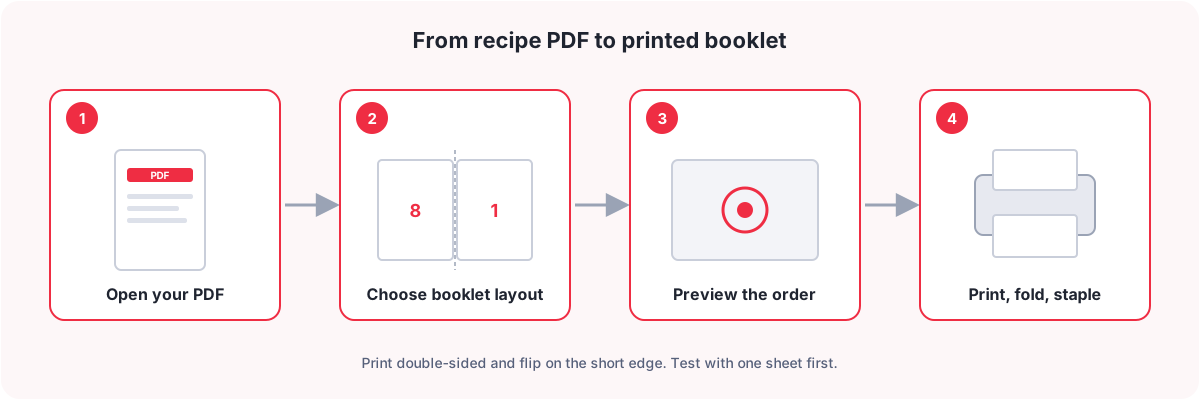
You do not need design software. Some PDF readers have a booklet option in their print dialog, but the options and wording differ from one program and printer to another. The steps below use the free PDFCherry PDF Booklet Maker, which gives you the same result with a preview before you print.
- Open the PDF first. Make sure it opens and the recipes are readable.
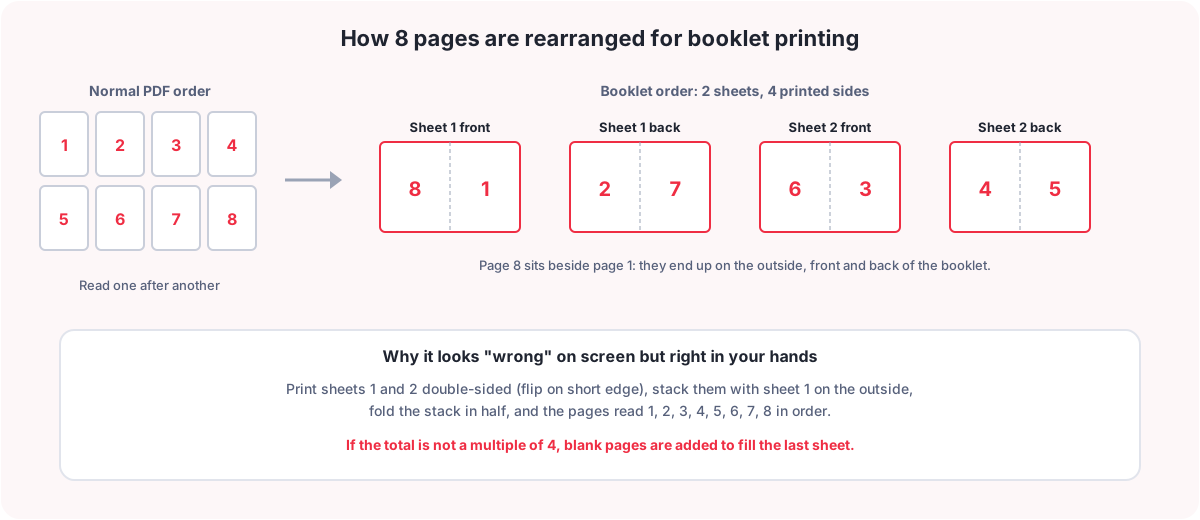
- Check the page count. Booklets are printed in groups of four pages per sheet. Any gap is filled with blank pages.
- Check the page orientation. Portrait pages make the best booklets. Two landscape pages side by side make a very wide sheet.
- Upload the PDF to the PDF Booklet Maker (up to 50 MB).
- Choose the binding side. Left binding is right for English and most languages.
- Choose your paper. Leave it on Automatic to make each sheet exactly twice as wide as a page, or pick Letter, A4, A3, Legal or A5 to match the paper you will print on. Pages are scaled to fit, so watch the scaling note.
- Tick “Keep the last page as the back cover” if your last page should stay on the outside, and add an inner margin of a few millimetres if text runs close to the spine.
- Check the sheet preview. It shows the front and back of every sheet, with the page numbers on each half.
- Make the booklet, then download it. It is a new PDF — your original is never changed.
- Print one test sheet, fold it and check the order before printing everything.
- Fold the whole stack in half and staple along the fold, if you want it bound.
Why the page order looks strange. In a booklet PDF the pages are not in reading order on screen — page 8 sits next to page 1, for example. That is correct. Once printed double-sided and folded, they read 1, 2, 3, 4 and so on. If you read the booklet PDF on screen and it looks “wrong”, that is normal.
Step-by-Step Visual Guide
Booklet Printing Settings
These are the settings that matter once you press print. Names vary between printers, so look for the closest match.
| Setting | What to choose | Why |
|---|---|---|
| Sides | Double-sided (duplex) | Booklet pages are paired on the front and back of each sheet. |
| Flip / binding edge | Flip on short edge (sometimes called tumble) | Booklet sheets are landscape, so the short edge keeps the back the right way up. |
| Scale | 100% or “actual size” | “Fit to page” shrinks the content and shifts the fold. |
| Paper size | The size you chose in the booklet maker | A mismatch makes the printer rescale or crop. |
| Orientation | Landscape, if the printer asks | Each sheet side holds two portrait pages side by side. |
| Pages to print | All | Printing only some sheets breaks the page order. |
No duplex printer? Print the odd-numbered sides first, turn the stack over and reload it, then print the even-numbered sides. Extract Even/Odd Pages can split the file for you. Test with one sheet first, because every printer feeds paper a little differently.
Before-You-Print Checklist
- ☐ Confirm the PDF opens correctly
- ☐ Check the page count
- ☐ Check the paper size
- ☐ Check portrait or landscape orientation
- ☐ Select booklet mode or make the booklet first
- ☐ Enable double-sided printing if your printer supports it
- ☐ Check the binding / flip option (short edge)
- ☐ Preview the booklet
- ☐ Print one test sheet
- ☐ Check the page order
- ☐ Check the margins
- ☐ Print the final copy
Troubleshooting
| Problem | Likely cause | What to check |
|---|---|---|
| Pages appear in the wrong order | Booklet order is not reading order, or the sheets were stacked incorrectly. | Stack the sheets with sheet 1 on the outside, fold them together, and use right binding only for right-to-left languages. |
| Text is cut off | The printer rescaled the page, or the recipes sit very close to the paper edge. | Print at 100%, not “fit to page”, and add an inner margin in the booklet maker. |
| Pages print too small | A large page size was fitted to a small paper size. | Match the booklet paper to the paper you print on, and read the scaling note in the booklet maker. |
| Blank pages appear | The page count is not a multiple of four. | This is normal. Use “Keep the last page as the back cover” if the blanks should go before it. |
| Back side is upside down | The printer flipped on the long edge. | Choose double-sided with flip on short edge. |
| Booklet has uneven margins | The paper size or scaling does not match the booklet layout. | Use the same paper size in both places, print at actual size, and add a gutter for the spine. |
| Printer does not support duplex printing | Many home printers print on one side only. | Print odd sides, flip the stack, then print even sides. Test one sheet first. |
| The booklet is too thick to fold | Too many sheets nested in one booklet. | Choose several smaller booklets of 4–6 sheets each and staple each one separately. |
Error Messages That Actually Help
A good tool never shows only “Invalid file”. Every error should say what happened, why it may have happened and what to do next. This is the wording the PDFCherry Booklet Maker uses for its own upload and processing problems, plus the printing problems that happen outside any tool.
| Technical issue | User-friendly message | Suggested next action |
|---|---|---|
| Unsupported file type | “Please upload a PDF file. This file type isn’t supported.” | Choose a PDF. Convert images or documents to PDF first. |
| File too large | “This PDF is larger than the allowed file size. Choose a smaller PDF to continue.” | Shrink it with Compress PDF, then try again. |
| Corrupted PDF | “We couldn’t read this PDF. The file may be corrupted or incomplete.” | Download the original again, or try a different copy. |
| Password-protected PDF | “This PDF is password-protected. Unlock the PDF and upload it again.” | Remove the password with Unlock PDF if you have the right to. |
| Upload failure | “Upload failed. Check your internet connection and try again.” | Check your connection, then press Try Again. |
| Conversion failure | “We couldn’t make this booklet. Your original file has not been changed. Please try again.” | Try again, check the PDF is not damaged or password-protected, or try a smaller file. |
| Page-count issue | “Enter valid page numbers, e.g. 1-12, 15.” | Check your custom page list is inside the document’s page count. |
| Printer unavailable | “Your printer isn’t responding. Check that it is switched on and connected.” | Check power, Wi-Fi or cable, and the paper tray, then print again. Or download the PDF and print it later. |
| Duplex printing unavailable | “Your printer doesn’t offer automatic double-sided printing.” | Print the odd sides, flip the stack, then print the even sides. |
| Download failure | “Your download didn’t finish. Please try again.” | Press Download again, or use Preview and save from there. Files are kept only for a short time. |
| Browser issue | “Preview isn’t available in this browser. Try a current version of Chrome, Edge, Firefox or Safari.” | Update or switch browser, then reload. |
| Network issue | “We lost the connection. Check your internet and try again.” | Reconnect, then retry. Your original file stays on your device. |
Empty and Success States
Empty state
No PDF uploaded yet. Upload your recipe PDF to start creating a printable booklet.
Upload PDF
Success state
Your booklet is ready. Preview the page order before printing.
Buttons you should see: Preview booklet, Download booklet, Print booklet and Start over.
On PDFCherry the results screen offers Download, Preview and print, plus Process Another PDF to start over. Your files are deleted automatically a short time after processing.
Frequently Asked Questions
Where can I find a Cuisinart ice cream maker recipe booklet PDF?
Start with the manufacturer’s own support or manuals pages and search for your exact model name and number. Check your original box and instruction book too. PDFCherry does not host Cuisinart manuals, so verify the source and the model before relying on any file.
Can I print an ice cream recipe PDF as a booklet?
Yes. Any PDF can be turned into a booklet. Upload it to the PDF Booklet Maker, check the preview, download the booklet and print it double-sided. It works for recipe books, manuals and zines alike.
How do I make a PDF into a booklet?
Upload the PDF, choose the binding side and paper, check the sheet preview and download the booklet. Print it double-sided with flip on short edge, fold the stack in half and staple along the fold.
Can I print a booklet on both sides of the paper?
Yes, and you should. A booklet pairs pages on the front and back of each sheet. Choose double-sided printing and flip on the short edge.
What if my printer doesn’t support duplex printing?
Print the odd-numbered sides first, turn the stack over and reload it, then print the even-numbered sides. Extract Even/Odd Pages can split the file for you. Print one test sheet to see how your printer feeds paper.
Why are my booklet pages in the wrong order?
Booklet pages are deliberately out of reading order on screen. They only read correctly after printing double-sided, stacking with sheet 1 on the outside and folding. Check the binding side and print a test sheet.
Why are my recipe pages cut off when printing?
The printer has probably rescaled the page, or the text is very close to the edge. Print at 100%, not fit to page, match the paper size to the one chosen in the booklet maker, and add an inner margin if the spine hides text.
What paper size should I use?
Use Letter or A4 for most home printing, and choose the same size in the booklet maker. With Automatic, each sheet is twice as wide as your page, which suits half-size pages printed on larger paper.
Can I print a PDF booklet from a phone?
You can make and download the booklet from a phone browser. Printing depends on your phone and printer, and not every phone offers double-sided or flip-edge options. Printing from a computer is usually more reliable.
How many pages should a booklet have?
Any number works, but multiples of four use paper best. Very thick booklets do not fold flat, so for long documents choose several smaller booklets of about 4–6 sheets each.
Why does booklet printing add a blank page?
Each folded sheet holds four pages, so the page count is rounded up to a multiple of four with blanks. In the booklet maker you can keep the last page as the back cover so the blanks go before it.
Can I save the booklet as a new PDF before printing?
Yes. The booklet is a new PDF you can download, preview, save to your cloud storage or share. Your original file is never changed, and files are deleted automatically a short time after processing.
What to Do Next
- PDF Booklet Maker to turn your recipe PDF into a print-ready booklet
- Merge PDF to combine several recipe files first
- Split PDF to cut a long file into separate booklets
- Resize PDF Pages if your pages are an odd size
- Extract Even/Odd Pages for printers without duplex
- Rotate PDF to fix sideways pages
- Compress PDF if the file is too large to upload
- Unlock PDF if a PDF you own is password-protected
You May Also Like
- PDF Reverse Page Order: How to Reverse the Order of Your PDF Pages
- How to Extract Odd or Even Pages From a PDF
- Alternate & Mix PDF Pages: How to Interleave Two PDFs Into One
Conclusion
Finding a Cuisinart ice cream maker recipe booklet PDF comes down to using the right source and checking your exact model. Turning it into something you can hold is easy once you know the steps: make the booklet, preview the order, print one test sheet, then fold and staple. Keep the booklet by your machine and use your manual for anything specific to how your model works.
Ready to Make Your Recipe Booklet?
Upload your PDF, check the sheet preview and download. Free, with no sign-up.
Make a PDF Into a Booklet