
Most PDF problems fall into a handful of jobs: combining files, breaking one apart, making it smaller, converting to or from images, controlling who can open it, and cleaning up what is inside. This guide points you to the right tool for each.
Combine or break up documents
- Join several PDFs into one: Merge PDF. Guide: How to Merge PDF Files.
- Cut one PDF into several files: Split PDF. Guide: How to Split a PDF.
- Keep only a few pages: Extract PDF Pages. Guide: How to Extract Pages.
- Drop a few pages: Delete PDF Pages. Guide: How to Delete Pages.
- Rearrange pages: Reorder PDF Pages.
Make the file smaller
- General size reduction: Compress PDF. Guides: How to Compress a PDF, Reduce PDF Size for Email.
- Drop unneeded colour: Grayscale PDF.
- Whole ordered pass: PDF File Optimization.
Convert to or from another format
- Images to a PDF: JPG to PDF or Images to PDF. Guide: JPG to PDF and Back.
- PDF pages to images: PDF to JPG, PDF to PNG, or PDF to TIFF.
- Get the plain text out: PDF to Text.
- Turn a text file into a PDF: Text to PDF.
- Combine phone scans: Combine Scanned Documents.
Control access and clean up content
- Add or remove a password: Protect PDF, Unlock PDF, Change PDF Password. Guide: Password-Protect a PDF.
- Black out sensitive text: Redact PDF. Guide: Redact a PDF Properly.
- Clear author and hidden data: Remove PDF Metadata. Guide: Remove Hidden Data.
- Set document properties: Edit PDF Metadata. Guide: Edit PDF Metadata.
- Lock form fields: Flatten PDF.
Fix a specific problem
- Pages are sideways: Rotate PDF. Guide: Rotate PDF Pages.
- Wide margins or an edge to trim: Crop PDF.
- Add numbering or a title line: Add Page Numbers, Add Header and Footer. Guide: Add Page Numbers.
- The file will not open: Repair PDF.
- Blank pages from a scanner: Remove Blank Pages.
What every tool has in common
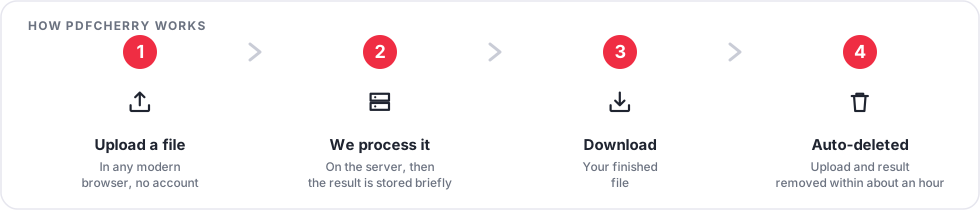
You upload a file in your browser, the server does the work, and you download the result. Nothing needs an account. The upload and the finished file are removed automatically a short time after processing, as described in the Privacy Policy. If a job needs to stay entirely in the browser, use the PDF Editor, which does not send the file anywhere.
Browse everything on the all tools page, or start with the guides.